Hey there,
Welcome back. And a warm hello to anyone joining us for the first time.
|
🍁 To review previous issues, visit theaieh.ca/articles |
Happy Canada Day. I hope you are somewhere comfortable, maybe with a cold drink, not thinking too hard about work. Or maybe you are thinking about work. Maybe you are thinking about a different job, a new direction, or just quietly wondering if the one you have is still the right one. That is more common than most people say out loud.
Either way, this issue is for you. Because job searching is one of those things that is genuinely exhausting, not because people are lazy, but because every application feels like a small project. The tailored resume. The cover letter. The research. The interview prep. It adds up fast, especially if you are doing it while also holding down the job you already have.
AI can help with all of it. Not to do your job search for you, but to take the parts that drain your energy and make them faster and less painful. Let's get into it.
The job search is broken. Here is how AI fits in.
Most job postings are not written for you. They are written by committees, approved by HR, and loaded with phrases like "dynamic self-starter" and "fast-paced environment" that mean almost nothing. Half the time it is genuinely hard to tell what the job actually is, what they really want, or whether it is even worth your time to apply.
And then once you decide to apply, you have to tailor your resume, write a cover letter that sounds enthusiastic without being cringeworthy, and somehow walk into an interview having anticipated every question they might ask.
AI does not solve the whole problem. You still have to do the work, make the calls, and show up as yourself. But it removes a lot of the friction that makes job searching feel like a second full-time job. Here is how.
Four prompts to try this week
|
Prompt 1: Decode the job posting Before you spend an hour tailoring your resume, find out what the posting is actually asking for. Paste the full job description into AI and ask it to translate the corporate speak into plain English. What are they really looking for? What do the buzzwords actually mean? Is there anything in there that should give you pause? This takes two minutes and saves you from putting effort into the wrong application. Sandra in Halifax saw a posting for a "Senior Relationship Manager" at a financial firm and had no idea if her background in customer service would be relevant. She pasted the posting into Claude and asked it to break it down. Turns out it was essentially a client retention role with some sales expectations attached. She knew exactly what to emphasize before she even opened her resume. Fill in the blank:
Ready to use example:
|
|
Prompt 2: Tailor your resume without starting from scratch You do not need AI to rewrite your whole resume. What you need is help figuring out which parts of your existing resume are most relevant to a specific job, and what you should adjust or reword to match what the employer is looking for. This is the part that takes forever when you do it manually. AI does it in under a minute. Give it your current resume and the job posting and ask it to tell you specifically what to change. Not a full rewrite. Just targeted suggestions you can apply yourself, in your own words. Marcus in Winnipeg had been using the same resume for three years. He pasted it into Claude along with a job posting for a project coordinator role at a construction company. AI flagged that his experience managing vendor relationships was buried near the bottom and suggested moving it up. It also pointed out two places where his wording was vague and gave him clearer alternatives. He made the changes himself and had a callback within a week. Fill in the blank:
Ready to use example:
|
|
Prompt 3: Write the cover letter you have been putting off Nobody enjoys writing cover letters. They feel awkward to write, they take forever, and half the time you are not even sure anyone reads them. But a good cover letter can still make a difference, especially for roles where a lot of candidates have similar qualifications on paper. The trick is giving AI enough context to write something that actually sounds like you and addresses what the employer cares about. Do not just ask it to "write a cover letter." Give it your background, the job posting, and a note about why you are interested. Then take what it gives you and rewrite the parts that do not sound like how you actually talk. The goal is a strong first draft, not a finished product you copy and paste. Priya in Calgary was applying for a community health coordinator role and had been staring at a blank document for two days. She gave Claude her resume, the job posting, and a few sentences about why she wanted to work in that area specifically. The draft it came back with was about eighty percent there. She rewrote the opening paragraph in her own voice and sent it. She got an interview. Fill in the blank:
Ready to use example:
One reminder on this one. Always reread the cover letter AI gives you and rewrite anything that does not sound like you. Hiring managers have been reading AI-generated letters for a while now. The ones that stand out are the ones that feel like a real person wrote them. |
|
Prompt 4: Prep for the interview This is the one most people skip. You get the interview, you feel good about it, and then you sit down with the hiring manager and they ask you something you completely did not see coming. AI cannot tell you exactly what questions you will get, but it can make a very good educated guess based on the job posting and your background. Ask it to generate the most likely questions for your specific role, then practice answering them out loud. You do not have to do this for hours. Even thirty minutes of thinking through your answers before you walk in makes a real difference in how you come across. Derek in Ottawa was going into an interview for a supervisory role in the federal public service, his first time applying for a management position. He asked Claude to give him the ten questions most likely to come up based on the job description, with a note on what each question was really trying to find out. He spent an evening working through his answers. He walked in feeling prepared instead of nervous. Fill in the blank:
Ready to use example:
|
Your challenge this week
If you are actively job searching, try Prompt 1 on the next posting you look at before you do anything else. Just paste it in and see what AI tells you. If you are not actively looking right now, try Prompt 4 anyway using a job posting in your field and your current background. It is a genuinely useful exercise even if you are not planning to go anywhere. You might be surprised what you learn about how your experience translates.
Coming up next issue
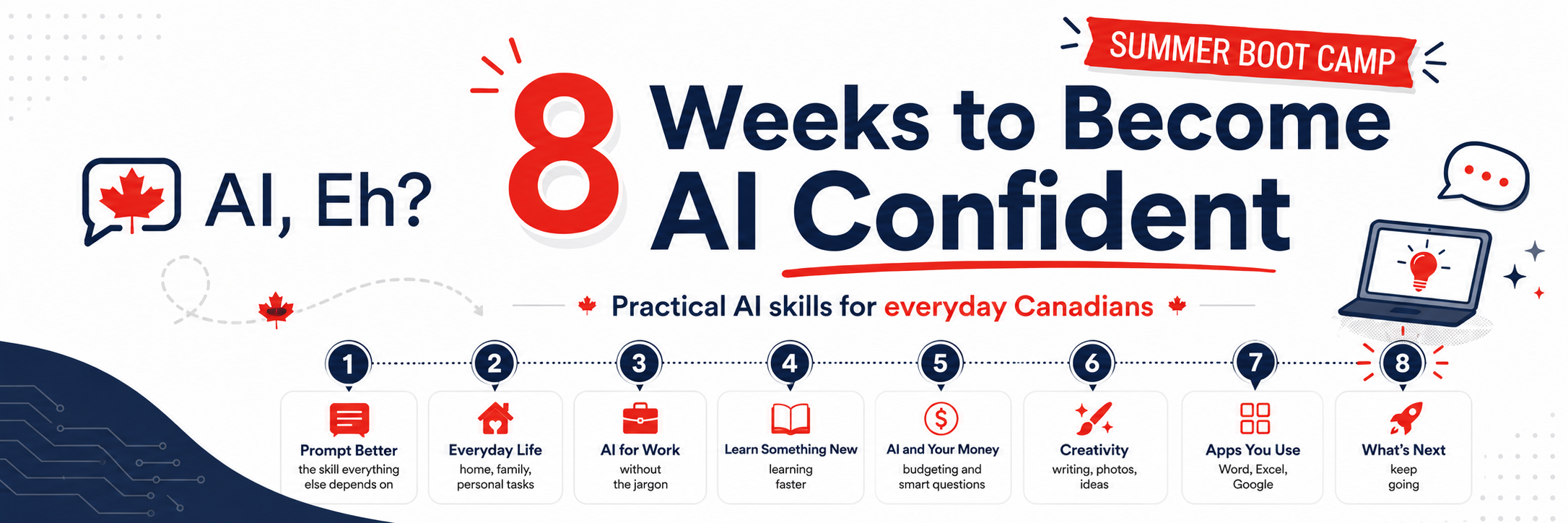
Next issue we are kicking off something a little different. Eight weeks. One AI skill per week. Built for everyday Canadians who want to actually feel confident with this stuff before summer is over.
It is called 8 Weeks to AI Confident and it starts next week. If you know someone who has been meaning to get started with AI but keeps putting it off, this is the perfect time to send them a link to subscribe. Week 1 drops next issue.
|
AI assisted, Human led. Whatever AI produces for you, always read it, verify it, and make it sound like you. AI is an incredible first draft machine. Your judgment, your voice, and your values are always the final layer. |
As always, I read every reply personally. Are you in the middle of a job search right now, or just keeping your options open? Hit reply and let me know. I am always curious where people are at.
If you found this useful, pass it along to someone who has been putting off that application. This one might be exactly what they need to get started.
|
Know someone who would love AI, Eh? Send them here: Subscribe for free |
Happy Canada Day,
Chris
Founder, AI, Eh?